
The official Tredict ChatGPT App is now available in the ChatGPT app catalogue. With it, you can have your training sessions stored in Tredict displayed and analysed in the ChatGPT chat, rename them, or even have ChatGPT create more complex structured workouts directly as a reusable training plan in Tredict.
Workouts planned via ChatGPT will then land on your watch, in the usual Tredict fashion, namely Garmin, Coros, Wahoo, Suunto or icTrainer, and soon (spoiler warning) even on your Apple Watch via Watchletic.
What makes the Tredict ChatGPT App special is that it works with a free ChatGPT account and you can have ChatGPT connected to Tredict in just a few clicks.
For anyone wanting to simply try out AI-powered endurance training analysis, the ChatGPT connector now provides a free option with a low barrier to entry.
Install the official Tredict ChatGPT App and connect directly with a free ChatGPT account
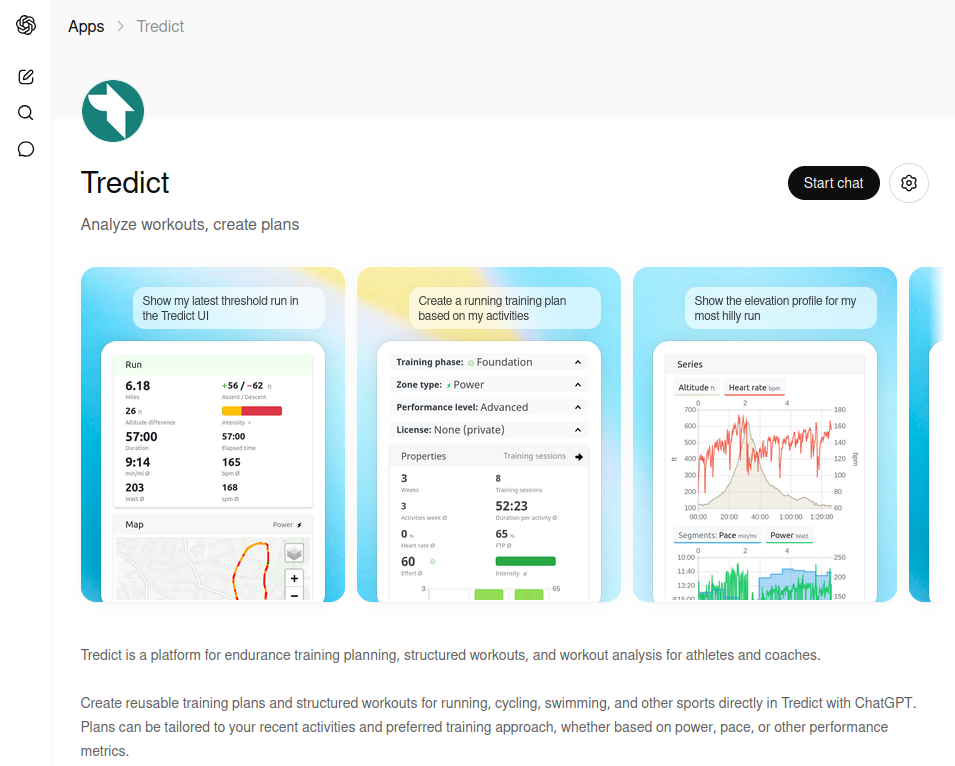
The Tredict ChatGPT App in the ChatGPT app catalogue can be connected in just a few clicks and used with a free ChatGPT account to analyse or plan your endurance sports training sessions.
Use cases
Quick analysis of a completed run
Here is what I asked ChatGPT:
@Tredict Please retrieve the activity details for my run today and give me a detailed assessment.
You can view the actual response in my shared chat history here:
https://chatgpt.com/share/69ed0882-77f0-832a-be37-fbfc6ec14d0a
Visual display of a training session
The Tredict ChatGPT App also includes what are called MCP Apps, which embed visual and interactive elements directly into the ChatGPT chat, provided by Tredict.
The keyword phrase "show it in the Tredict activity UI" opens exactly that:
@Tredict Tell me more about my run yesterday and show it in the Tredict activity UI.
ChatGPT displaying the activity UI, an MCP App, within the chat.
Renaming and describing training sessions
To rename training sessions and set a better description, you could send this prompt:
@Tredict Please give all training sessions from the past 2 weeks a better title and description.
ChatGPT will then fetch the activity list and use the activity-update tool to change the titles and descriptions of the relevant training sessions. This action is of course reversible; old training titles are saved so they can be restored. ChatGPT cannot break anything in your Tredict account. All write actions are designed so that they cannot alter or destroy your actual data.
Creating a structured workout
With a simple plain-language instruction, you can use ChatGPT to create reusable training sessions and workouts directly in Tredict.
For example, you can give the following instruction:
@Tredict Have a look at the basic endurance pace from my last activity and create a heart rate-based structured workout in Tredict with a warm-up phase (65% HRmax) and threshold intervals of 4x4 minutes. When done, show me the plan in Tredict.
ChatGPT creates a structured workout in Tredict that can be executed directly on the sports watch.
Limitations and more complex use cases
The ChatGPT chat has a comparatively small context window overall. This means that, firstly, ChatGPT itself tries to be frugal with token usage and consequently skips things that would actually be helpful, and secondly, when the context window is full, it simply stops working or starts doing odd things.
Prompting
In practice, ChatGPT tends to be quite reserved when it comes to making use of the tools offered by the Tredict server.
For example, the following two instructions make a significant difference in whether ChatGPT simply fetches the general activity list or actually loads and evaluates the numerous details, time series and metrics of a single activity.
❌ @tredict Tell me more about my run today.
Here ChatGPT will stay frugal and only fetch the activity list with basic metrics, presenting you with simple values like pace and heart rate.
You can, however, nudge ChatGPT in the right direction with a more direct prompt:
✅ @tredict Fetch the details of my run today and give me a detailed assessment.
With this, ChatGPT will make the effort to fetch the detailed information and give you a comprehensive analysis.
When creating a planned structured workout, it is equally helpful to go into detail:
@tredict Please create a heart rate-based structured cycling session for me with a warm-up phase at 65% HRmax and 6 threshold intervals. To gauge effort and duration, have a look at my completed training sessions beforehand.
This is already quite detailed and requires a bit of prompting effort, but it leads to better results.
Complex use cases
For complex use cases such as extensive analysis requiring a large context, and the creation of reusable training plans with structured runs, cycling sessions and swim workouts spanning weeks and months, I recommend connecting the Tredict MCP Server to an AI assistant like Claude.ai, which handles these tasks with ease.
One simply has to accept that the free ChatGPT connector is not powerful enough for that. The limitation lies not with the underlying Tredict MCP Server but with the host, in this case the ChatGPT chat. For that, you get the opportunity to try exactly these things out for free!
Read this blog article for more on the general capabilities of the Tredict MCP Server and how to connect it to Claude, Mistral and other AI assistants:
Use AI assistants and LLMs with the help of the Tredict MCP server and interactive MCP apps
And you can also find pre-configured prompts for ChatGPT with the Tredict GPTs for endurance sports AI.
Data privacy
The Tredict ChatGPT App is not automatically connected to your Tredict account and has no access whatsoever until you have initiated the connection yourself. Once established, the connection between ChatGPT and your Tredict account can be disconnected again at any time. This is the same mechanism as connecting your watch manufacturer's API to Tredict, where you also gave your explicit and clearly visible consent once.
Be aware that with a free ChatGPT account, ChatGPT may use all data you enter into the chat to train its AI.
If you would prefer otherwise, turn off "Improve the model for everyone" under "Data Controls" in the ChatGPT settings, which also works with a free account. Alternatively, use Claude with the Tredict MCP Server and set the "model training" option to "Opt-Out".
Tredict itself is fully GDPR-compliant and has a transparent privacy policy. Feel free to put it side by side with those of other training platforms and see for yourself how precisely it describes what happens to your data. Tredict does not use AI systems to process your data and does not use your data to train AI models.
Summary
With the official Tredict ChatGPT App, you can analyse your endurance sport activities and training history with the help of AI and ChatGPT using your free account in just a few clicks, and send structured workouts to your Garmin, Coros, Suunto, Wahoo or Apple Watch. If you already have a ChatGPT account, the barrier to entry is low. Simply give it a try.
Addendum: OpenAI has since renamed apps in ChatGPT to plugins. The Tredict ChatGPT App is therefore now called the Tredict ChatGPT Plugin.