
Tredict is now officially integrated with the Zwift API and has left beta. Many thanks to Zwift for making this possible. The integration works with all platforms supported by Zwift, which is especially good news for Apple iOS and Android users! Once you have established the connection, your structured workouts planned in Tredict are automatically available for execution in Zwift, and your completed rides and runs flow back automatically into your Tredict training calendar for detailed analysis and form calculation. Together with the integrations of Wahoo, Hammerhead, icTrainer and GoldenCheetah, Tredict further strengthens its offering for cycling and triathlon.
FTP, intensity levels and date-based power zones
Zwift and Tredict are a good conceptual match, because Zwift's own ZWO workout format is watt- and FTP-driven. Intervals there are not defined as fixed wattages, though, but relative to FTP (Functional Threshold Power). This is exactly how you can plan in Tredict. Structured workouts consist of intensity levels that are based on your date-based power zones and automatically adjust their absolute values when your FTP changes over time.
A Zwift workout thus emerges organically and natively from your planning in Tredict. Based on the relative FTP capacity values of the planned intervals, the correct wattage is automatically calculated in Zwift from your Zwift FTP. So make sure your FTP value in Zwift is kept up to date. A training plan laid out over weeks stays aligned with your actual form without you having to adjust wattages manually.
Execute structured workouts automatically in Zwift
A structured workout that you create in your training calendar is transferred to Zwift right after saving. The same happens when you apply a complete training plan. In that case, all of the scheduled workouts are sent to Zwift. Zwift displays the current workouts plus one week into the future. The training plan can be one you built yourself, one from your coach, or one created by AI.
You will find the transferred workouts in Zwift under "Custom" in the "tredict" folder and can start them there directly.
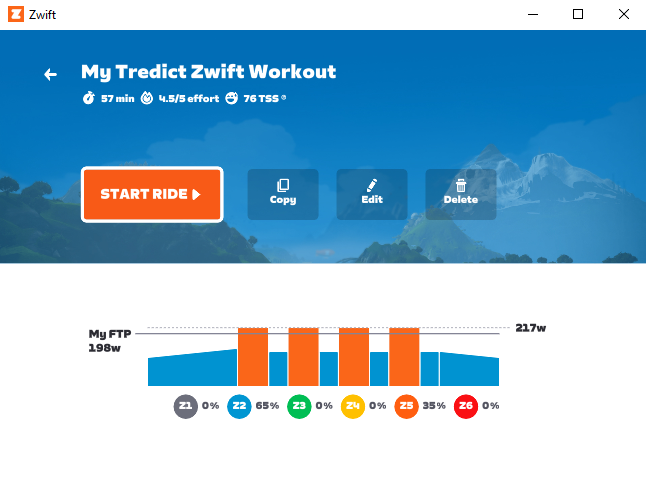
A workout planned by Tredict in the Zwift detail view, the watt ranges were calculated from the Zwift FTP.
In addition to bike workouts, you can also send your planned running workouts to Zwift. This can be configured separately in Tredict, because you probably prefer to do many of your runs outdoors with your running watch. This way, only the workouts you actually want to execute in Zwift remain visible there.
Running workouts do not have to be planned watt-based. If you plan your running intervals as pace ranges relative to your FTPa, your threshold pace, the relative percentages are transferred to Zwift just like with FTP. Zwift then determines the appropriate running pace from them.
Create structured workouts for Zwift with AI
The Zwift integration becomes particularly interesting in combination with the Tredict ChatGPT Plugin (formerly "Tredict ChatGPT App") or the Tredict MCP Server with Claude or Perplexity. You can have complete structured workouts or entire training plans created by AI, which are then automatically available for execution in Zwift via Tredict.
An instruction to ChatGPT or Claude could look like this:
@tredict Create 4 variants of power-based pyramid workouts based on my FTP and my power zones.
ChatGPT creates the workouts inside a reusable training plan. Once you apply the plan, the workouts land as planned training sessions in your Tredict calendar and are automatically synchronised to Zwift from there. By the way, the "Tredict ChatGPT Plugin" works with a free ChatGPT account!
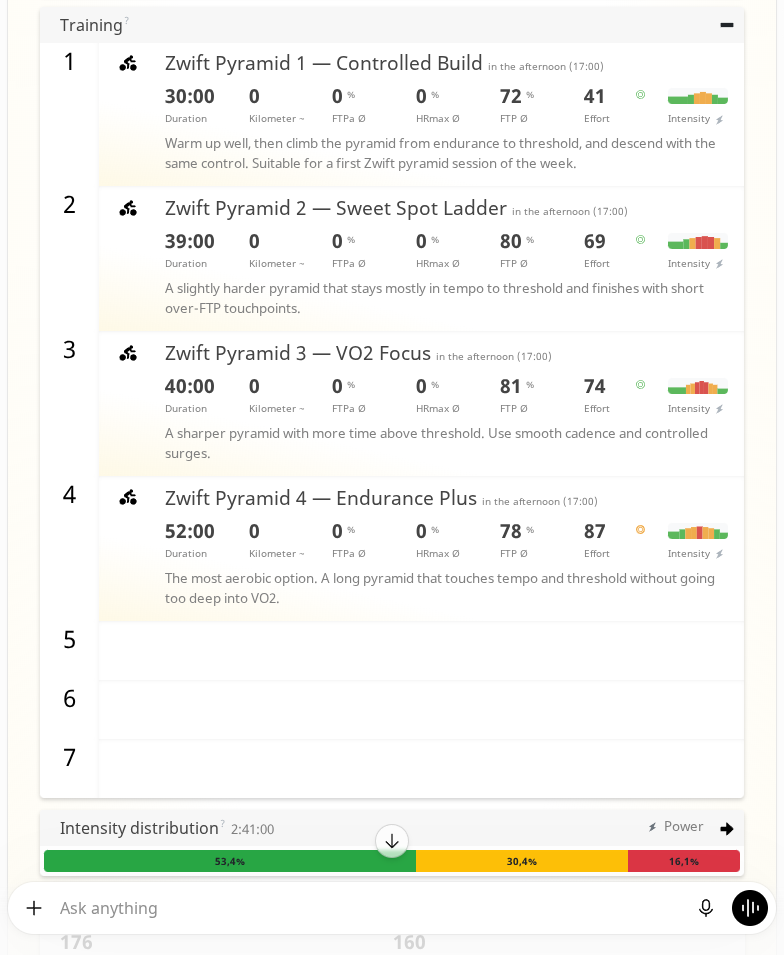
Four variants of pyramid workouts created with AI in the ChatGPT chat, shown in the Tredict ChatGPT App, which can be automatically synchronised to Zwift.
Here is the training plan created and published in ChatGPT for you to have a look at:
Public training plan - Zwift Power Pyramid Variants
With AI, you can quickly build extensive reusable workout libraries in Tredict that match your needs and can be used with Zwift at any time. And of course you can also have existing Zwift activities analysed by an AI with the "Tredict ChatGPT Plugin".
Analyse completed rides and runs in Tredict
In the other direction, your activities completed in Zwift are automatically transferred to your Tredict training calendar and training planning and linked to the scheduled workout as usual. This way, your indoor training flows into your analysis, your zone distribution and your FTP detection just like any other session.
Optionally, you can also import your Zwift training history from the past year when connecting.
Coaches and triathlon clubs
For coaches and triathlon clubs, this also opens up new options for their Tredict athletes, because triathletes in particular are often on Zwift. A coach plans structured sessions directly in their athlete's Tredict calendar or applies a training plan to several athletes at the same time. The workouts are then automatically available in Zwift, calculated based on each athlete's power zones and dynamically updated whenever something changes!
Connecting to Zwift
How to establish the connection and which data is synchronised in which direction is described in detail in the FAQ:
Zwift - Automatically synchronise planned and completed workouts
The process is simple. On the connection page, select the Zwift icon in the "Services" category and log in with your Zwift credentials. After that, synchronisation runs automatically in both directions.