Strength training shouldn't be an afterthought for endurance athletes. Strong muscles hold your running or cycling form together as fatigue sets in, and they lower your risk of injury. That is why so many endurance athletes have asked to track their strength training in Tredict the same way they track their runs, rides and swims. Now they can. Tredict analyses your strength training set by set, and you plan it in the workout editor like any other session. And because Tredict connects through the Tredict MCP Server and the Tredict ChatGPT App, you can have ChatGPT, Claude or Mistral build a whole strength training plan too.
Analyse your strength training set by set
If your watch records individual sets, Tredict reads them from the FIT file and shows you every set on its own. This works with any recording that contains set data, for example from a Garmin. Your sessions arrive in Tredict automatically, as usual, through Garmin Connect, COROS and the other connected services.
At the top of the activity, the Sets card summarises the session. You see the number of sets and exercises, the reps, the tonnage as the total of reps times weight, your heaviest weight, the time spent on sets, and the total and average rest between sets.
From the calendar week into the activity, to the Sets card, into the sets table and into the exercise view.
Below it sits the Sets tab. The sets table lists every set with its exercise type and a matching icon, the exercise name, the duration, the reps, the weight, the tonnage, the average heart rate, the rest between sets and the recovery. Recovery shows you how many beats your heart rate drops during the rest that follows. Hover over a set and Tredict highlights its span in the heart rate graph below; on a phone, a tap is enough.
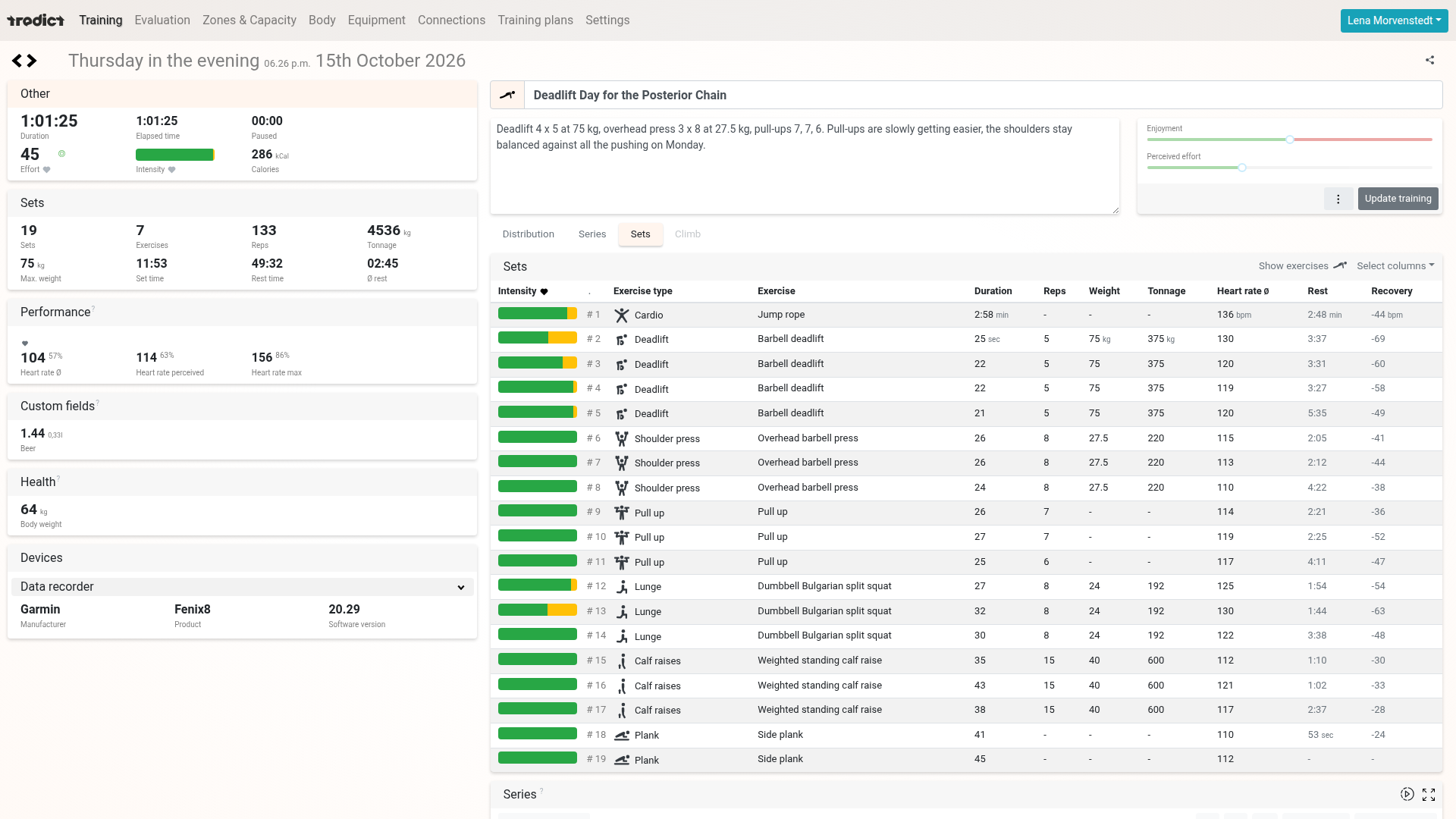
The sets table shows every single set, here a deadlift day with 19 sets, 133 reps and 4,536 kg of tonnage.
Show exercises switches you to the exercise view. There, Tredict groups the sets by exercise and adds an estimated one-rep max (1RM), so you can follow how your working weights develop over the weeks. Select columns lets you show extra values such as maximum heart rate or calories, and hide the ones you don't need.
The overview in your calendar
Your strength sessions slot into your training calendar. The tiles show the exercises, the duration, the sets, the reps, the heart rate, the tonnage and the training effort, along with the intensity distribution. That way you see strength, running and cycling side by side at a glance across a week or a month.
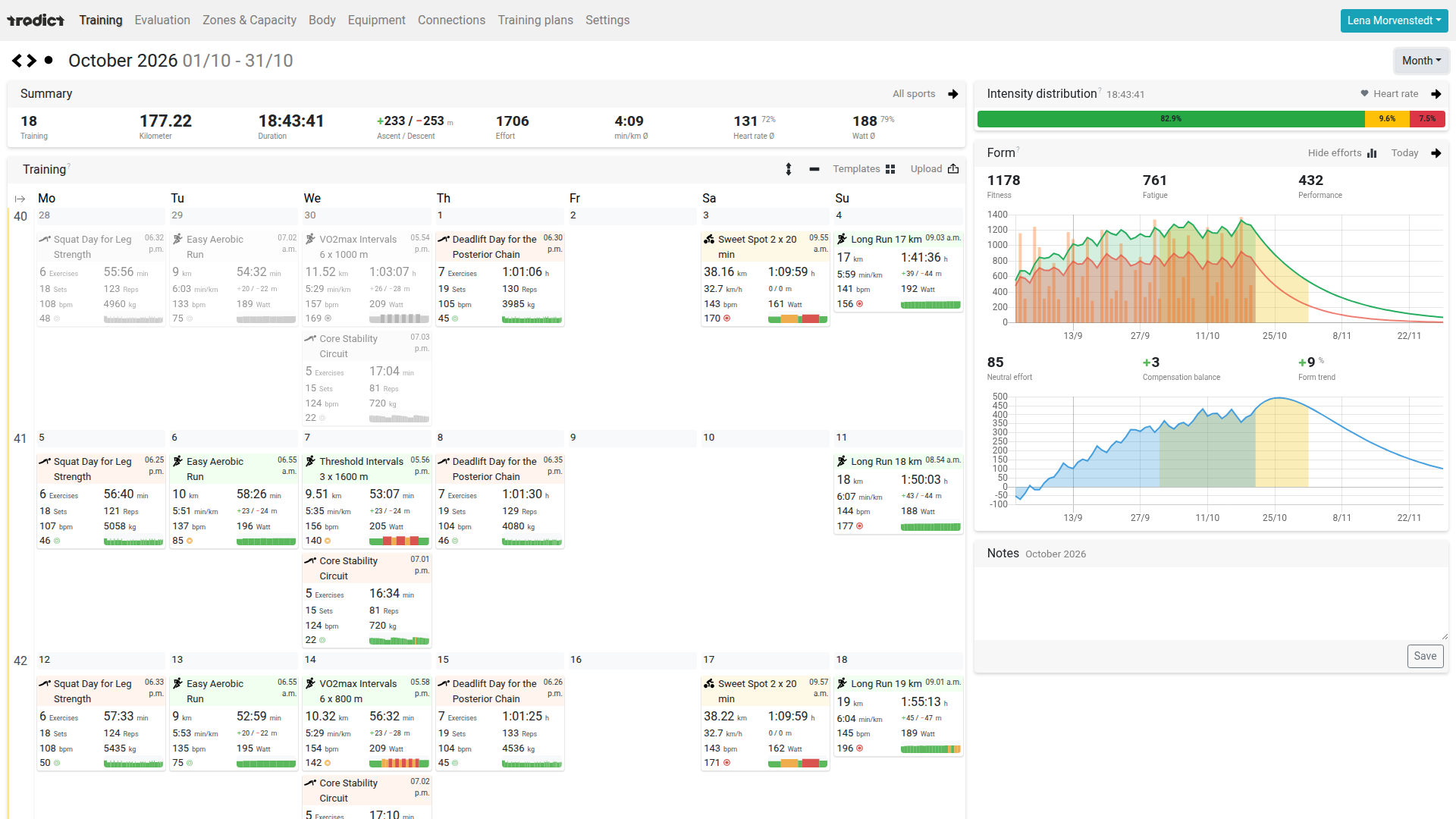
The month calendar puts strength, running and cycling side by side, and the strength tiles show exercises, sets, reps and tonnage.
Switch the calendar to the year list and you get a dedicated Strength training column group with sets, reps, tonnage and heaviest weight. With the sport filter you hide everything except your strength sessions and see your progress as a table.
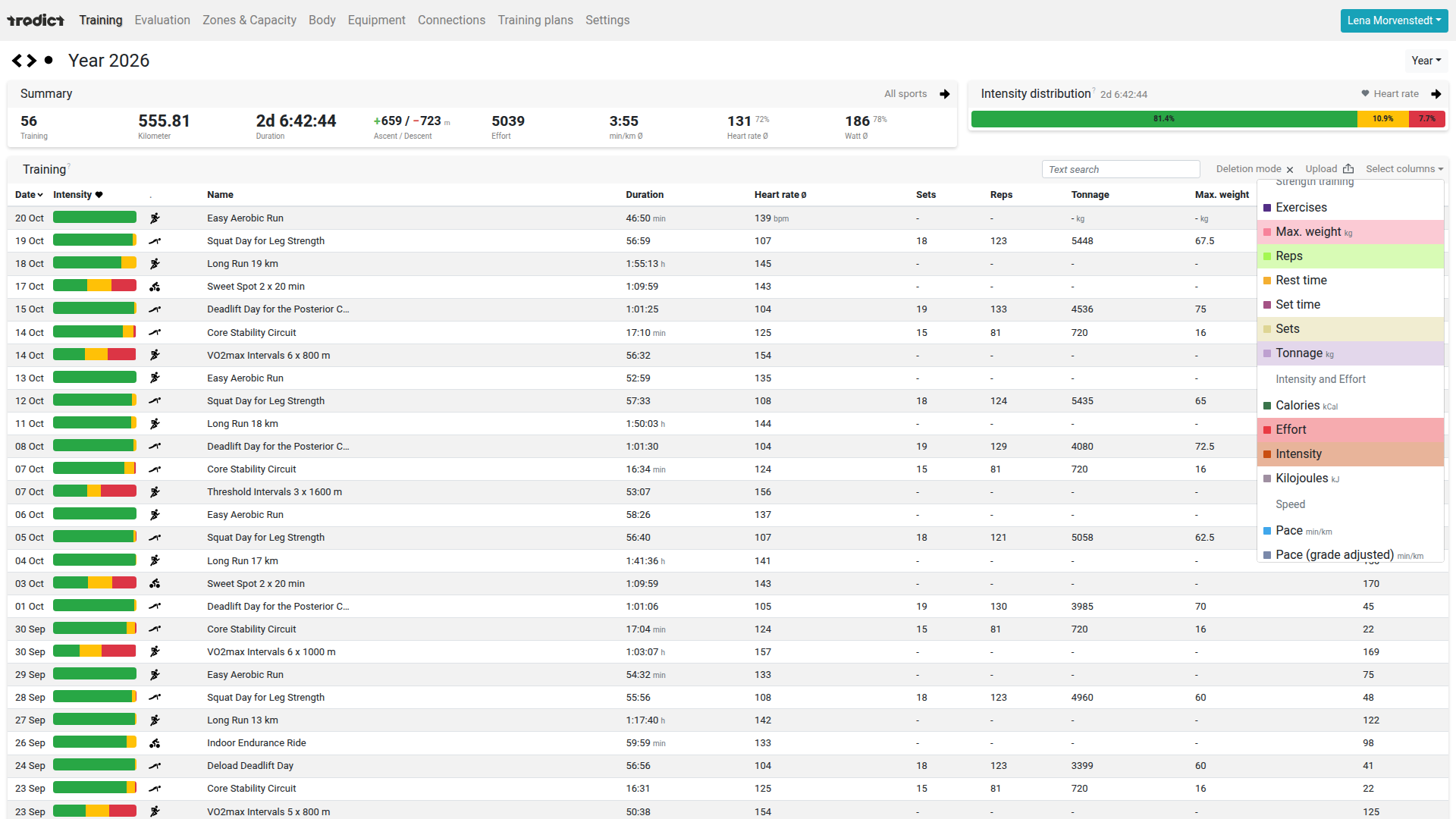
The Strength training column group adds sets, reps, tonnage and heaviest weight to the year list.
Progress over the weeks
In the analysis, you find your strength sessions under the sport Other. The aggregation adds up tonnage, sets and reps per week, month or year. In the example, weekly tonnage grows over eight weeks from around 8,400 to more than 10,600 kilograms, and the deload week at the end of September stands out clearly as a dip. So you can see whether your volume is really climbing or whether a single week is out of line.
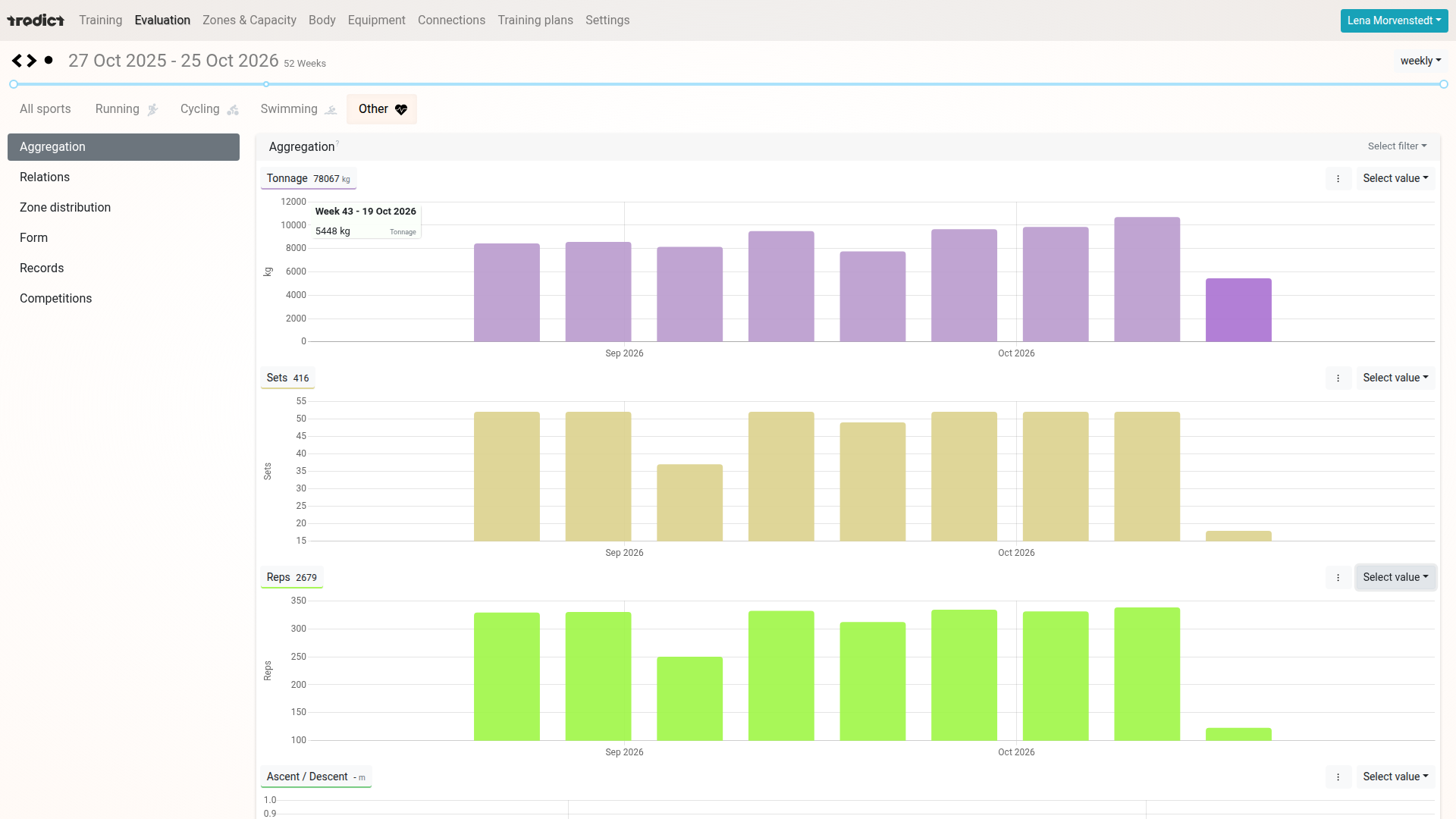
Tonnage, sets and reps per week, with the deload week at the end of September sitting as a dip between the build-up weeks.
Planning a strength session
Strength training in Tredict is not only analysis, it is planning too. In the workout editor, alongside running, cycling, swimming and Other, there is a Strength training tab. There you build it up set by set. You pick the exercise type from the icons, choose the exercise from a catalogue of more than 1,800 exercises in 51 categories, and enter the weight.
For the set target you choose reps, a time, or an open set that you end on the watch with the lap button. On top of that come the rest between sets and a heart rate target. Repeat turns a single set into a whole group, say four sets of deadlifts with five reps and a minute and a half of rest. From the reps, Tredict estimates the duration of the session, and the Sets card shows you tonnage, heaviest weight and set times while you are still planning.
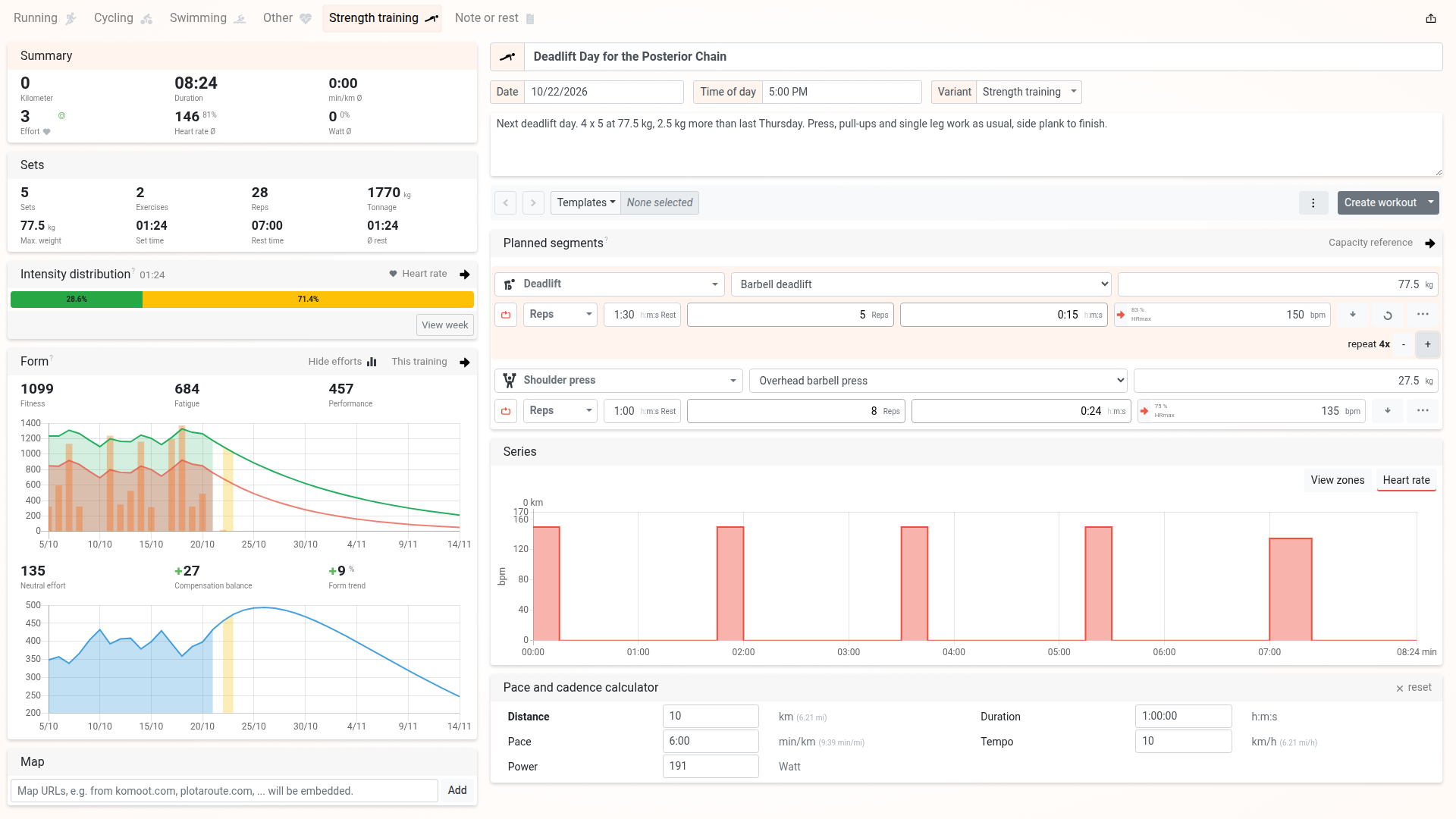
In the Strength training tab you plan each set with exercise type, exercise, weight, set target, rest between sets and heart rate target, and Repeat turns it into several sets.
You send the planned day to your watch, just as you do with running and cycling workouts. You download it as a FIT workout or push it through Garmin Connect, COROS and other services. And you save the session as a template, so you can find it again in the template list and drag it onto other days.
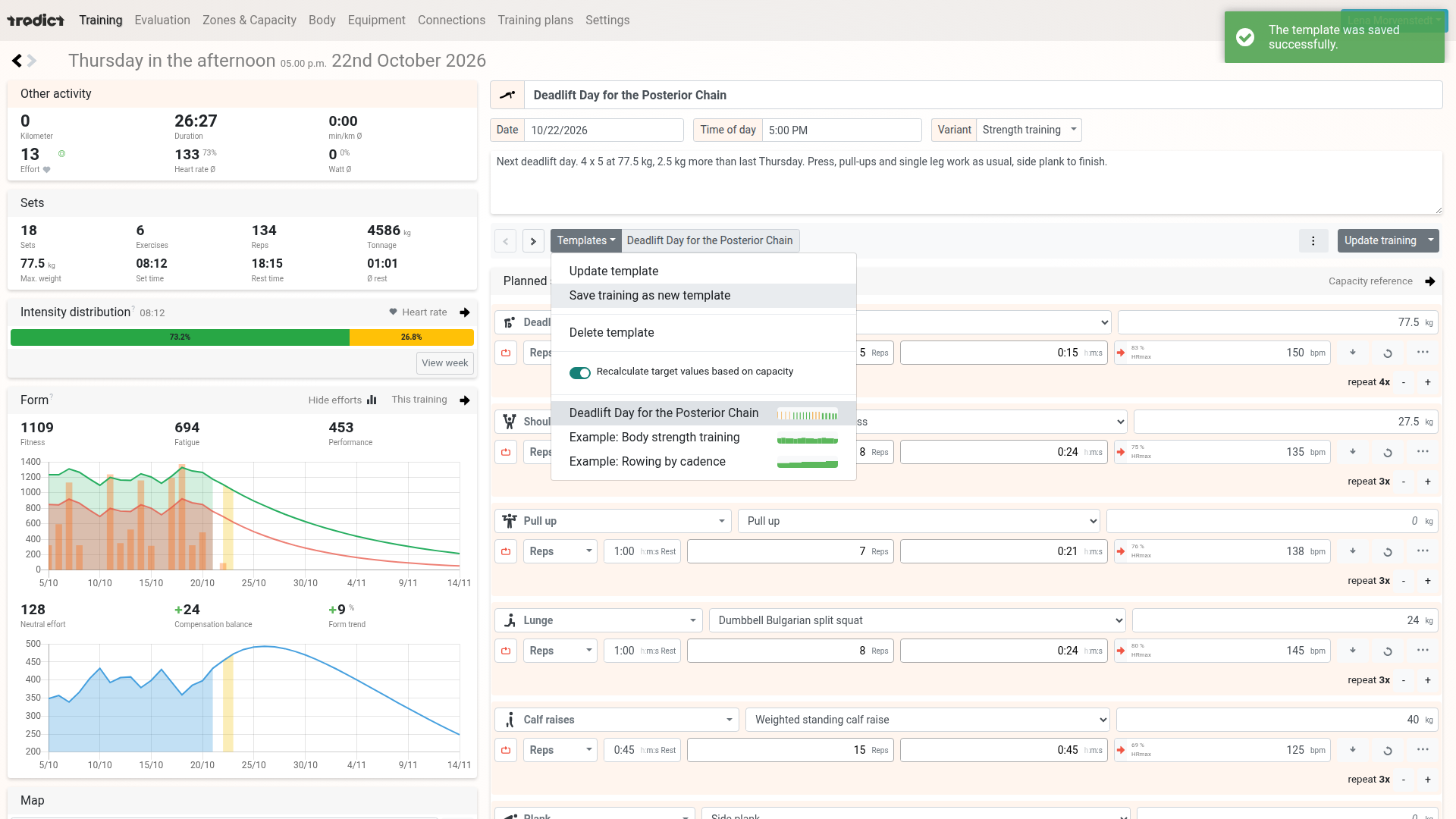
A planned strength day with six exercises, here being saved as a template for the weeks ahead.
Create strength training with ChatGPT, Claude and Mistral
All of this is open to your AI assistant too. Through the Tredict ChatGPT App and the Tredict MCP Server, ChatGPT, Claude, Mistral Vibe, Perplexity and Grok reach your training data, analyse the sets you have done and plan in Tredict. You ask the AI to create a single strength session or a whole strength training plan with exercises, reps and weights, or to go through the sets of a session you have finished.
A short request to ChatGPT is all it takes.
Create a strength training plan in Tredict for my core stability that I can do alongside my existing running training.
The Tredict ChatGPT App then pulls the right exercises and creates the plan in Tredict.
On a short request, the Tredict ChatGPT App creates a two-week strength training plan for core stability and sets it up in Tredict.
For an easy start, you connect ChatGPT in one click through the official app, which works with a free ChatGPT account as well. For larger plans spanning several weeks, Claude suits the job with its large context window. If you prefer a European option, you connect Mistral Vibe from France. The finished plan then sits in Tredict, from there it goes to your watch, and you can keep it as a reusable training plan.
The AI picks the exercises from the same catalogue as the editor, more than 1,800 exercises in 51 categories, and the Garmin Training API supports this full catalogue. That is why Garmin watches in particular benefit from AI planning. So you can connect Garmin with ChatGPT or Claude, have a strength training plan built from your training data, and load it onto your watch through the Garmin Training API.
Sharing a strength session
If you want to show a session, you create a public link from the training options. The page shows the Sets card, the heart rate graph and the sets table, with no sign-in needed. Your coach or a training partner then sees your strength day exactly as you see it in Tredict.
Building strength plans for your athletes as a coach
So there is something new for coaches as well. With ChatGPT, Claude or Mistral you build reusable strength training plans for your endurance athletes and apply them to individual athletes in Tredict. That way you add targeted strength work to their running and cycling, and help them improve their running efficiency. To see how coach and athlete work together in Tredict, read Coaching athletes with Tredict.
Looking ahead
Tredict is also considering an import for Hevy workouts. If enough of you ask for it, it will come. If you train with Hevy, let us know.