Coros watches are known for their exceptionally long battery life, reliable tracking, and a focused feature set built around endurance sports. But what if you could pair that with artificial intelligence to plan your training, analyse your performance, and send structured workouts directly to your Coros watch? With Tredict, that is exactly what you can do.
Tredict is the bridge between your Coros and AI assistants such as ChatGPT, Claude.ai and Perplexity, enabling seamless AI training planning, structured workout creation, and deep performance analysis, including sleep and HRV data, for runners, cyclists and triathletes.
This article explains how Coros athletes can use the official Tredict ChatGPT App with a free ChatGPT account and the Tredict MCP Server for complex tasks like long-term AI training planning to put their training data to work and automatically sync AI-generated plans straight to their Coros device.
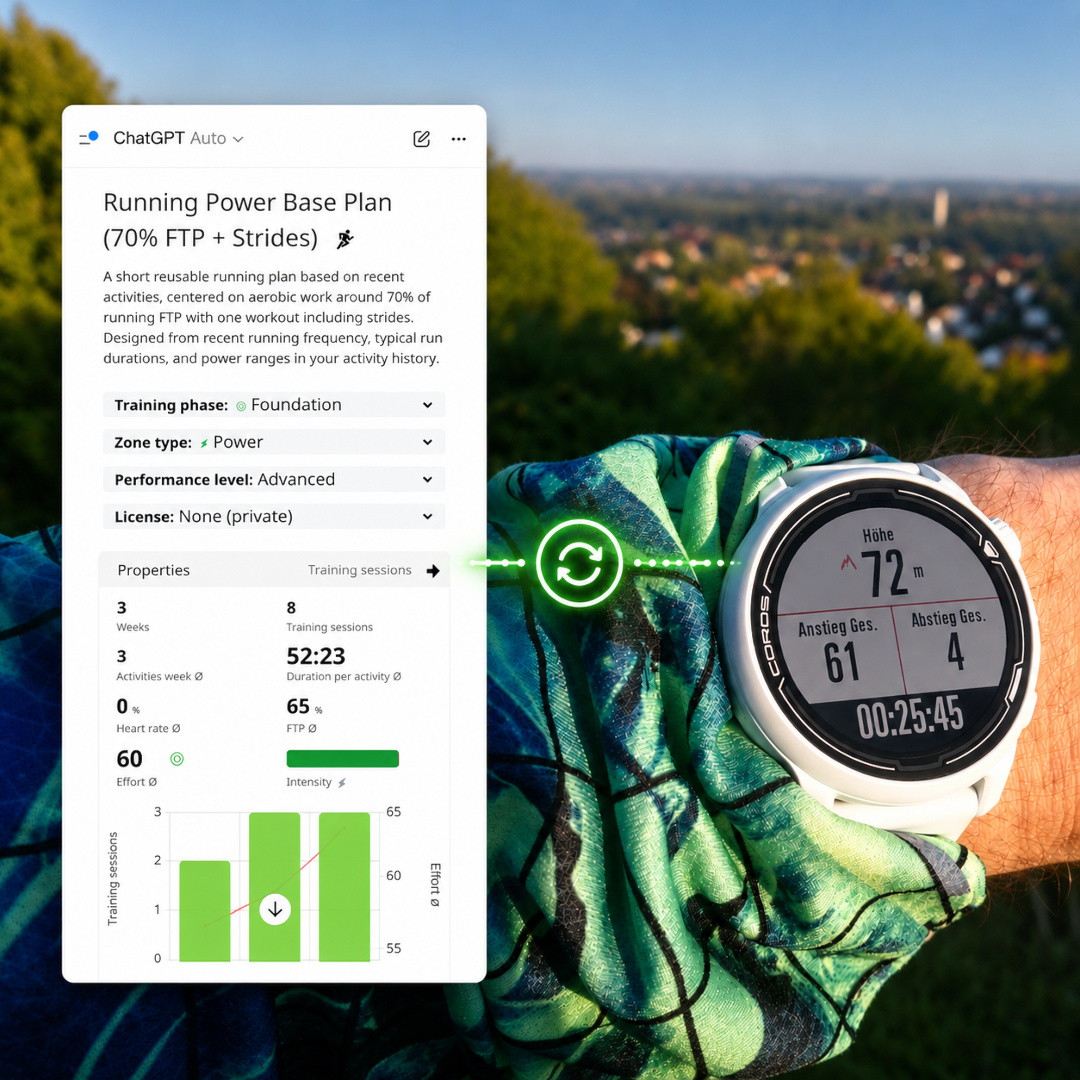
The Tredict ChatGPT App syncs AI-created training plans to your Coros Pace 2 watch. (Illustration)
The Tredict ChatGPT App: free AI planning for Coros
The official Tredict ChatGPT App is the easiest entry point for Coros users who want to experiment with AI-powered training analysis and planning. It works with a free ChatGPT account and can be connected in just a few clicks.
Here is what makes it powerful for Coros athletes:
- Analyse completed Coros workouts in ChatGPT. Ask ChatGPT to review your latest threshold run, long ride or interval session recorded on your Coros device. The app retrieves your activity details directly from Tredict and provides a detailed assessment.
- Create structured workouts for Coros in reusable training plans with ChatGPT. Describe your desired session in plain language, for example: "Create a 4 x 4 minute threshold interval run with a 10 minute warm-up at 65% HRmax." ChatGPT builds the structured workout inside a reusable Tredict training plan, which is then automatically synchronised to your Coros watch.
- Iterative AI planning works exceptionally well with ChatGPT and Coros. The most effective workflow is iterative: have ChatGPT analyse your last training week, then ask it to plan the next 1 to 3 sessions based on that analysis. The workouts land directly on your Coros device. Tredict handles the transfer automatically.
As an integration partner with direct access to the official Coros Training API, Tredict automatically pushes any workout created by ChatGPT via the Tredict app to the Tredict Training Plan inside your Coros calendar. You simply put on your watch and go.
Claude.ai and Perplexity: complex multi-week training plans for Coros
While the ChatGPT app excels at quick analysis and short-term planning, Claude.ai and Perplexity unlock the full power of the Tredict MCP Server for more ambitious projects. If you want a complete 8-week marathon build-up, a periodised cycling base plan, or a triathlon preparation block spanning months, these are the tools to use.
The Tredict MCP Server gives Claude.ai and Perplexity direct access to your entire Coros training history, sleep, HRV, capacity values, zone distributions and equipment data. The AI can then build plans that actually fit your fitness level instead of handing you a generic template.
- Connect Claude.ai with Tredict for interactive planning with visual MCP Apps embedded directly in the chat.
- Connect Perplexity with Tredict to combine AI planning with Perplexity's research capabilities and model selection.
Once a multi-week plan is created in Tredict, the next 7 days of scheduled Coros workouts are automatically synced to your watch through a rolling sync window. As the AI adds or adjusts sessions, the Coros calendar stays up to date.
Claude.ai creating a multi-week training plan for Coros via the Tredict MCP Server.
The official Coros MCP Server
Coros launched their own Coros MCP Server as a beta in May 2026 for testing. It provides read-only access to your training data, letting you connect your Coros account to ChatGPT or Claude and ask questions about your training. This is a promising step for the Coros ecosystem and worth a look.
Currently, the Coros MCP Server returns aggregate session metrics. In contrast to the Tredict MCP Server, it does not provide lap splits or second-by-second data, and it cannot create workouts or training plans, as of now. Most importantly, a paid ChatGPT account is required, though Coros has indicated that this may change.
Tredict goes further. It uses the official Coros Training API, provides full data depth including second-by-second time series, sleep and HRV data, reads your training history and writes structured training plans back to your Coros watch. It embeds interactive visuals in the chat, lets the AI reschedule workouts, and annotates your training log. It works today, including with a free ChatGPT account. While Tredict is an official integration partner of the Coros API, it remains manufacturer-independent. If you use multiple devices, including those from other manufacturers such as Garmin, Suunto or Wahoo, your AI training setup stays the same. Your plans, your history and your AI connection endure.
Per-second time series: the data advantage for Coros users
The Tredict MCP Server is currently the most capable AI server for endurance sports, and Coros users benefit directly because their devices record particularly rich data.
When the MCP Server retrieves an activity, it provides the AI with detailed per-second time series that may include:
- Running and cycling power output
- Heart rate series in high resolution
- Ground contact time
- Ground contact balance (left / right asymmetry)
- Cadence, pace, altitude, GPS position and more...
This level of detail means the AI does not just see average pace and average heart rate. It sees exactly how your power drifted during the third interval, how your heart rate reacted to the hill, and whether your ground contact time shifted as fatigue crept in. For Coros users recording advanced running dynamics, this turns AI analysis from a rough summary into a real performance review.
Interactive visual elements inside your AI chat
A distinctive feature of the Tredict MCP Server is its interactive MCP Apps, which embed visual UI widgets directly into the chat history of ChatGPT and Claude.ai.
Instead of reading a plain text description of your run, you can type:
@tredict Show me the tempo intervals of last week in the UI.
The AI responds by displaying the full Tredict activity UI directly inside the chat: a detailed map, time series charts for power and heart rate, lap splits, and all standard metrics. For Coros athletes, this means you can visually review the workout you just finished within the same conversation where you are planning the next one. The iterative planning workflow becomes concrete and immediate.
ChatGPT is displaying my tempo intervals directly and interactively within the chat via the Tredict ChatGPT App.
Determine lactate threshold and running FTP with AI
Thanks to the detailed time series provided by the Tredict MCP Server, you can use AI to determine key capacity values directly from your Coros-recorded activities without visiting a lab.
Lactate Threshold Heart Rate (HRlth)
By analysing the heart rate and power time series from specific threshold workouts, AI models can estimate your lactate threshold heart rate with surprising accuracy. For example:
@tredict Analyse the time series from my last 2 tempo runs and determine my lactate threshold heart rate for running.
Functional Threshold Power (FTP) for running
Similarly, AI can determine your running FTP by examining power and heart rate intervals, applying linear regression and extrapolation to threshold intensity. I tested this across six different AI models, all connected via the Tredict MCP Server. You can read the full test and methodology here:
Six AI models determine my running FTP
The ability to derive these values from your existing Coros data, rather than performing dedicated laboratory tests, saves time and keeps your training zones current.
Getting started: your Coros AI setup
- Connect an AI assistant. Choose your preferred entry point:
- For quick, free analysis and short-term planning: Install the Tredict ChatGPT App.
- For complex multi-week plans and interactive visual analysis: Connect Claude.ai, Connect Perplexity or any other MCP capable client, like Gemini CLI or Mistral Vibe Chat, via the Tredict MCP Server.
- Connect Coros to Tredict. Go to "Settings -> Services" in Tredict and link your Coros account.
- Import your Coros training history. After connecting, trigger the import of your past workouts from Coros into Tredict. This gives the AI your full training background to analyse and build plans from.
- Enable Coros training plan sync. In the same settings area, activate "Synchronisation of scheduled trainings with Coros". This ensures any AI-planned workout lands on your watch.
Why the Tredict MCP Server is a good AI companion for Coros
Tredict is an endurance sports platform for training analysis and planning, used by athletes and coaches since 2020. Once you connect your Coros account to Tredict, every run, ride and swim is automatically synchronised. AI assistants can then read your training history, analyse it, and create new workouts that flow back to your watch. The full chain looks like this: Coros records your training, Tredict stores and structures it, AI analyses and plans your next sessions, and Coros executes them.
Summary
Whether you want a free, low-barrier way to experiment with AI training analysis using the Tredict ChatGPT App, or you need the full scope of the Tredict MCP Server with Claude.ai for serious long-term planning, the combination of Coros hardware and Tredict's AI integrations is one of the most complete AI training planning setups available in endurance sports today, for athletes and coaches.
More on what Tredict gives your AI to work with: Nine reasons for Tredict as the foundation of your AI training.

Felix Gertz
Felix is the creator and developer of the endurance sports training platform Tredict. Since 2020, Tredict has been valued as a platform for training analysis and training planning by endurance athletes and coaches around the world.