Body data
Body data
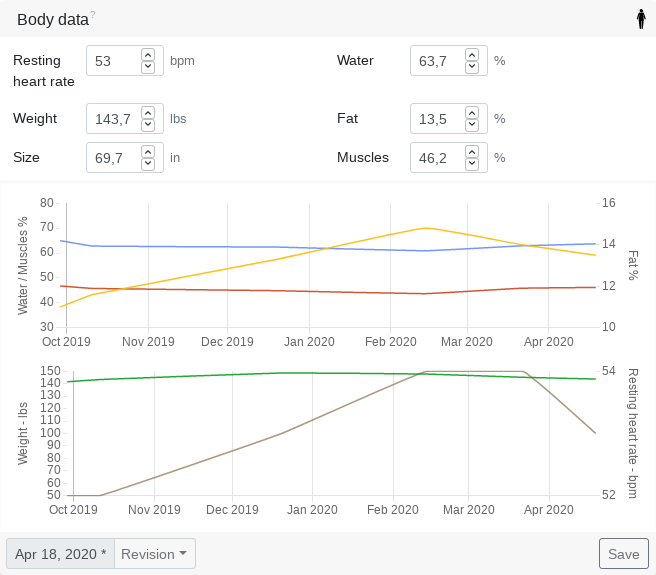
The body data changes with your age and fitness level and can be adjusted, updated and tracked via revisions.
Values such as resting heart rate or weight are important for the effort calculation or the efficiency metrics.
Tredict automatically imports your body metrics, HRV and sleep data from all supported device manufacturers; alternatively, you can upload them via the Tredict API.
See: Which recording devices and services are supported?
Resting heart rate
The resting heart rate, or static resting heart rate, is the heart rate that you can consistently achieve when you are completely relaxed.
The static resting heart rate is used to calculate effort by heart rate, the Vo2Max and other capacity indicators. Therefore, you should only change the static resting heart rate if it has really changed over a longer period of time. Otherwise the capacity indicators lose their comparability.
The static resting heart rate is best determined after waking up, when you have slept well, are completely stress-free, relaxed and healthy.
Dynamic resting heart rate
The dynamic resting heart rate is the lowest heart rate you have reached during the day and is usually measured by your fitness watch.
The dynamic resting heart rate is increased by factors such as stress or illness and therefore cannot reflect your absolute capacity. If you have measured a very low dynamic resting heart rate over a longer period of time, then you can consider transferring this to the static resting heart rate so that your effort and capacity indicators can be calculated more accurately.
Dynamic maximum heart rate
The dynamic maximum heart rate is the highest heart rate you have reached during the day and is also measured by your fitness watch.
The dynamic maximum heart rate is not your absolute maximum heart rate, which you can only reach in the toughest competitions and is therefore not suitable for calculating your capacities. In combination with the dynamic resting heart rate, however, you can draw conclusions about your activity behaviour or state of health.
Heart rate variability (HRV)
Heart rate variability describes the extent to which the intervals between two heartbeats vary. To do this, Tredict uses the average night-time value for RMSSD in milliseconds, as measured by your watch or ring whilst you sleep.
An HRV below your personal normal range may indicate fatigue, stress or the onset of an illness. It is difficult to compare absolute values between different people; what is meaningful is the trend in your own values.
For each day, Tredict calculates a baseline based on the average of the previous 42 days, excluding the day in question. A baseline is only established once at least 21 readings have been recorded during this period.
If your HRV deviates by no more than 25 per cent from the baseline, it is marked green. If it is 25 to 50 per cent below the baseline or more than 25 per cent above it, it is marked yellow; if it is more than 50 per cent below the baseline, it is marked red.
Sleep
Tredict retrieves your total sleep duration for the night from your watch or ring.
As with HRV, a baseline is calculated for each day based on the previous 42 days, provided that at least 21 readings are available. If your sleep duration is between 50 and 75 per cent of the baseline, it will be highlighted in yellow; if it is below that, it will be highlighted in red.
Display of HRV and sleep
Form card
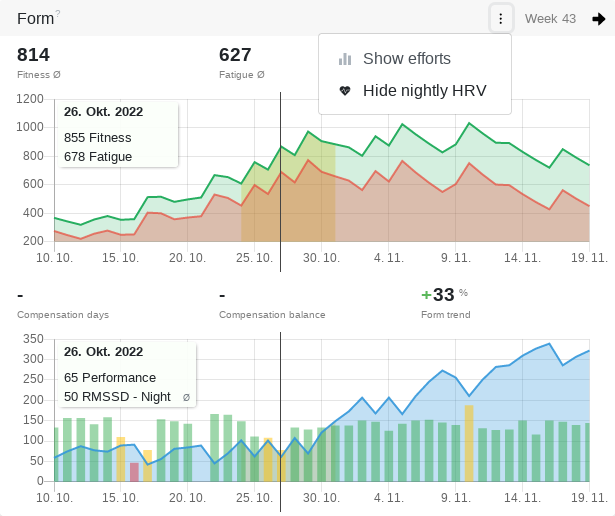
Using the Form Card menu, select ‘Show night-time HRV’ to display the HRV alongside your performance, colour-coded relative to the baseline.
Health card
On an activity page, the ‘Health’ card displays HRV, sleep, dynamic resting heart rate and body weight as at the date of the activity. If you hover your mouse over a value, you’ll see the corresponding average.
Yearly calendar view of training sessions
Using ‘Select columns’, you can display RMSSD and Sleep as colour-coded columns.
Aggregation and Relations diagram
Here, you can analyse HRV and sleep over different time periods or compare them with other metrics, such as your dynamic resting heart rate.
Settings
Under ‘Connected Services’, you can specify for each service individually whether HRV and sleep data should be synchronised. This helps you avoid conflicts when multiple devices provide the same data.
Height
Using your body size, you can determine your optimal cadence in relation to speed in the pace and cadence calculator.
Water, fat and muscle
The ratio of water, fat and muscle to one other is an important indicator of your overall performance capabilities.