Connect Claude Code with Tredict
FAQ
-
Devices and Connections
- Which recording devices and services are supported?
- Export a planned workout to my Garmin device
- What is the difference between an automatically uploaded scheduled workout and a workout FIT file?
- Garmin Connect - How to connect and synchronize my device?
- Suunto - How to connect and synchronize my watch?
- Polar Flow - How to connect and synchronize my watch?
- Coros - How to connect and synchronize my watch?
- Wahoo - Connect and synchronize
- icTrainer - Using the Tredict training plan with the roller trainer
- Oura Ring - Connect and synchronise
- Does HealthFit transfer my Stryd data from the Apple Watch?
- Zwift - Automatically synchronise planned and completed workouts
- Zwift - Synchronise via Today's Plan
- Personal API - Connect your own scripts or personal applications
- Tredict API - Connect your platform or application
- Model Context Protocol and AI integration
- General
-
Training
- How to unlink a pre-planned workout?
- How to fix corrupt workout data?
- Correct a faulty recorded swim stroke
- Can I change the date and time of my workout?
- Can the laps of an activity be calculated manually?
- Can I display a run without the walking breaks?
- Why is the date of my virtual training in a different time zone?
- Supported sports
- Calendar and Training Overview
- Coaching and Athlete Connection
- Training plans
- Evaluation
- Zones
LLMs are artificial systems that make mistakes and are no substitute for a trainer or your own mind.
To connect Claude Code to the ‘Tredict MCP Server’, follow these instructions.
Add the MCP server to Claude Code
Open a terminal and run the following command to add the Tredict MCP server to Claude Code:claude mcp add --transport http tredict https://www.tredict.com/api/mcp/v2Start Claude Code in the terminal and enter the command
/mcp to check the connection status.If you are not connected, you will see the following:
❯ claude.ai Tredict · ✘ failed
Select the Tredict entry and confirm the action authenticate. A browser window will open and you can follow the authentication process, which will take you back to the terminal. If this does not work, you can also connect to the MCP server directly via Claude Web. The connection will then also appear in Claude Code. To do this, follow the instructions in the Tredict FAQ for the Connection via Claude Web. If you are connected via the web, restart your Claude terminal for the changes to take effect. If everything went well, you will now see:
❯ claude.ai Tredict · ✔ connected
OAuth client credentials for Claude
You should provide these “OAuth Client Credentials” when you are asked for them.:OAuth Client ID: claude
OAuth Client Secret: You can simply leave this field blank.
Example prompts with Claude Code
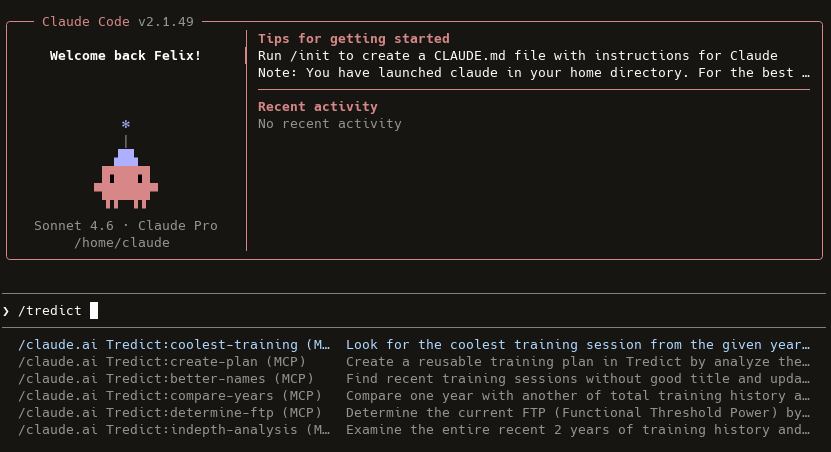
Now you can use the ‘Tredict MCP Tools’ directly in Claude Code. Just get started by typing /tredict in the Claude Terminal prompt to see a list of available tools and prompts.
Find detailed descriptions of the tools, prompts and resources of the "Tredict MCP Server" here: Tredict MCP Server Documentation.
Example prompts:
/claude.ai Tredict:create-plan (MCP)Claude will guide you through the right questions and steps to create a comprehensive training plan for you!
/claude.ai Tredict:better-names (MCP)Set better training titles and descriptions for your completed activities.
/claude.ai Tredict:coolest-training (MCP)Displays your most impressive workout based on your training history.
/claude.ai Tredict:determine-ftp (MCP)Determine your current FTP (Functional Threshold Power) based on your training history.
Further information on configuring Claude Code can be found in the Documentation by Claude Code.
Example: Creating a training plan with Claude Code
Claude Code Terminal has loaded the Tredict plan creation tool and a training plan for running is created directly in Tredict.
The resulting training plan, which was created directly in Tredict with the help of Claude Code.
Click on it to view it in detail.
Click on it to view it in detail.
Next question:Connect ChatGPT with Tredict
Previous question:Connect Claude Web with Tredict
Overview:View all questions