Connect Claude Web with Tredict
FAQ
-
Devices and Connections
- Which recording devices and services are supported?
- Export a planned workout to my Garmin device
- What is the difference between an automatically uploaded scheduled workout and a workout FIT file?
- Garmin Connect - How to connect and synchronize my device?
- Suunto - How to connect and synchronize my watch?
- Polar Flow - How to connect and synchronize my watch?
- Coros - How to connect and synchronize my watch?
- Wahoo - Connect and synchronize
- icTrainer - Using the Tredict training plan with the roller trainer
- Oura Ring - Connect and synchronise
- Does HealthFit transfer my Stryd data from the Apple Watch?
- Zwift - Automatically synchronise planned and completed workouts
- Zwift - Synchronise via Today's Plan
- Personal API - Connect your own scripts or personal applications
- Tredict API - Connect your platform or application
- Model Context Protocol and AI integration
- General
-
Training
- How to unlink a pre-planned workout?
- How to fix corrupt workout data?
- Correct a faulty recorded swim stroke
- Can I change the date and time of my workout?
- Can the laps of an activity be calculated manually?
- Can I display a run without the walking breaks?
- Why is the date of my virtual training in a different time zone?
- Supported sports
- Calendar and Training Overview
- Coaching and Athlete Connection
- Training plans
- Evaluation
- Zones
LLMs are artificial systems that make mistakes and are no substitute for a trainer or your own mind.
Follow these steps to connect Claude.ai Web to the ‘Tredict MCP Server’ and the ‘Tredict MCP App’.
Add the Tredict connector to Claude Web
Go to"Customise -> Connectors" in the Claude web interface or click on this link: Claude Connectors.Under ‘Connectors’, click on the
"Plus Button" and then select "Add custom connector" from the drop-down menu.A modal window with the settings opens.
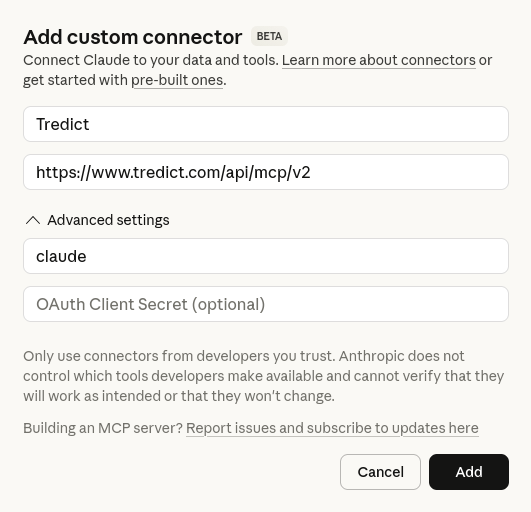
Fill in the fields in the modal as follows:
Name: Tredict
Remote MCP Server URL: https://www.tredict.com/api/mcp/v2
"Advanced settings" and enter the following OAuth credentials:OAuth Client ID: claude
OAuth Client Secret: You can simply leave this field blank.
"Add" Button to start the OAuth2 flow. You will be redirected to the Tredict authorisation page and, after successful authentication, back to the Claude web interface.You are now connected! Click on the Tredict connector to see all available tools and permissions and set them as needed.
"Always allow" can be selected to ensure everything runs smoothly.Choose from ready-made prompts
In the ‘Claude Chat’ input field, you can now select ready-made prompts from Tredict by clicking on ‘Add from Tredict’. These prompts guide you through a query of parameters that are relevant to a prompt, helping you to better specify a request to Claude.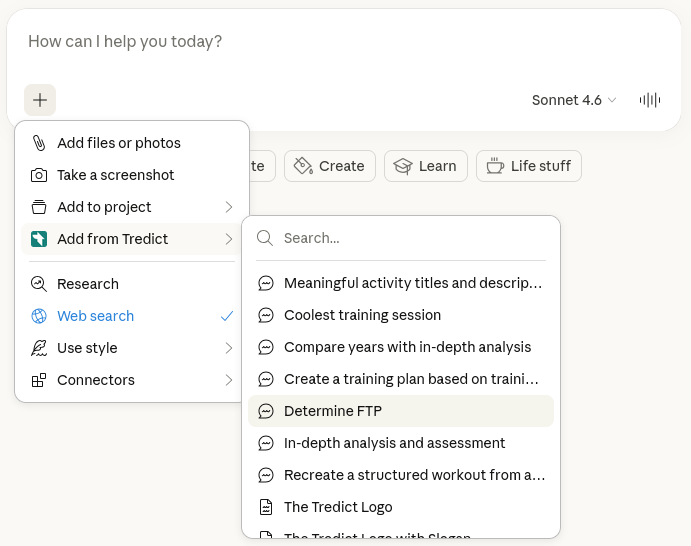
Example prompts to Claude Web
Now you can use the ‘Tredict MCP Tools’ directly in Claude Web, for example with these prompts:
"Take a close look at yesterday's interval training and use it to create a new structured workout for me in a reusable training plan in Tredict."
"Analyse my training history and determine my functional threshold power (FTP) for cycling."
"Create a 4-week running training plan in Tredict. Analyse my performance and training history beforehand so that you can get an idea of my fitness level."
"Show me my best training session from last month."
"Find training sessions without good titles, analyse them, and set better titles and descriptions in Tredict."
"Analyse my training history and determine my functional threshold power (FTP) for cycling."
"Create a 4-week running training plan in Tredict. Analyse my performance and training history beforehand so that you can get an idea of my fitness level."
"Show me my best training session from last month."
"Find training sessions without good titles, analyse them, and set better titles and descriptions in Tredict."
Find detailed descriptions of the tools, prompts and resources of the "Tredict MCP Server" here: Tredict MCP Server Documentation.
Example video: Reproduce an executed workout in a new structured workout
Claude analyses a completed long interval training session and, based on this activity, creates a reusable structured workout in Tredict, which is then displayed in the Tredict MCP app.
Next question:Connect Claude Code with Tredict
Previous question:Tredict API - Connect your platform or application
Overview:View all questions