Connect Mistral Le Chat with Tredict
FAQ
-
Devices and Connections
- Which recording devices and services are supported?
- Export a planned workout to my Garmin device
- What is the difference between an automatically uploaded scheduled workout and a workout FIT file?
- Garmin Connect - How to connect and synchronize my device?
- Suunto - How to connect and synchronize my watch?
- Polar Flow - How to connect and synchronize my watch?
- Coros - How to connect and synchronize my watch?
- Wahoo - Connect and synchronize
- icTrainer - Using the Tredict training plan with the roller trainer
- Oura Ring - Connect and synchronise
- Does HealthFit transfer my Stryd data from the Apple Watch?
- Zwift - Automatically synchronise planned and completed workouts
- Zwift - Synchronise via Today's Plan
- Personal API - Connect your own scripts or personal applications
- Tredict API - Connect your platform or application
- Model Context Protocol and AI integration
- General
-
Training
- How to unlink a pre-planned workout?
- How to fix corrupt workout data?
- Correct a faulty recorded swim stroke
- Can I change the date and time of my workout?
- Can the laps of an activity be calculated manually?
- Can I display a run without the walking breaks?
- Why is the date of my virtual training in a different time zone?
- Supported sports
- Calendar and Training Overview
- Coaching and Athlete Connection
- Training plans
- Evaluation
- Zones
Note: The use of Mistral Le Chat with the Tredict MCP Server is currently considered experimental by Tredict.
LLMs are artificial systems that make mistakes and are no substitute for a trainer or your own mind.
LLMs are artificial systems that make mistakes and are no substitute for a trainer or your own mind.
Follow these steps to connect Mistral Le Chat to the ‘Tredict MCP Server’.
Connect via Tredict Access Token
Navigate to the ‘Intelligence’ page in the ‘Le Chat’ web interface by selecting this entry in the left-hand side panel.Click on ‘Connectors’ and then on the ‘Add connector’ button.
Create a Tredict Personal API access token now in the Tredict app under Settings -> Personal API / MCP -> Access token.
Now you can fill in the fields under the ‘Custom MCP Connector’ tab as follows:
Connector Server: https://www.tredict.com/api/mcp/v2
Authentication method: API Token Authentication
Header name: Authorization
Header type: Bearer
Header value: [Insert your Tredict Personal API Access Token here]
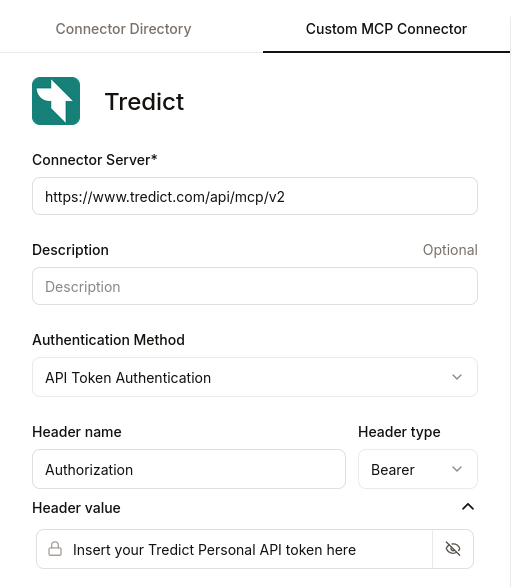
Voilà! You should now be connected.
Choosing the Tredict selector in Le Chat
Now select the Tredict selector in the Mistral Chat input field by clicking on the corresponding icon and selecting ‘Tredict’.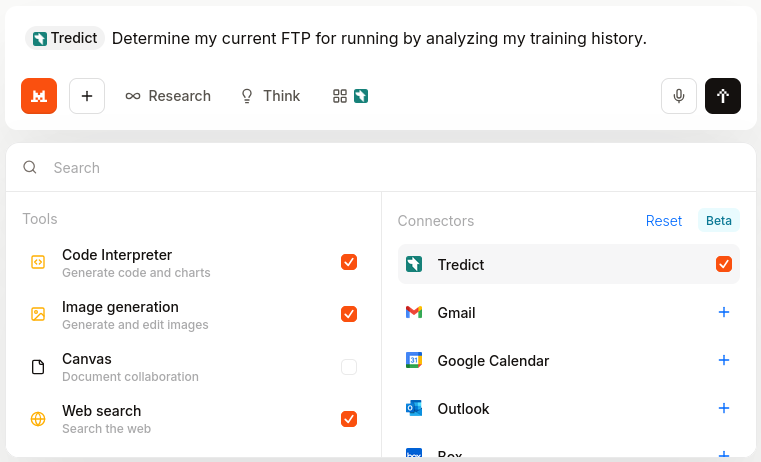
The Tredict selector must be selected for Le Chat to use the Tredict MCP tools.
Example prompts for Le Chat
Now you can use the ‘Tredict MCP Tools’ directly in Mistral Le Chat, for example with these prompts:
"Please find recent training sessions without good titles, analyse them, and set a better title and description in Tredict."
"Analyse my training history and determine my functional threshold power (FTP) for running."
"Show me my best training session from last year."
"Create a two-week training plan for running and cycling in Tredict. Based on my heart rate. Analyse my performance and training history beforehand so that you can get an idea of my fitness level."
"Analyse my training history and determine my functional threshold power (FTP) for running."
"Show me my best training session from last year."
"Create a two-week training plan for running and cycling in Tredict. Based on my heart rate. Analyse my performance and training history beforehand so that you can get an idea of my fitness level."
Here you will find a list of Tredict MCP server tools, resources and prompts: Tredict MCP Server Documentation.
Example video: Set better training titles with Le Chat
The titles and descriptions of completed training sessions are improved by Le Chat directly in Tredict.
Next question:Connect Mistral Vibe with Tredict
Previous question:Connect Codex with Tredict
Overview:View all questions