Connect Mistral Vibe with Tredict
FAQ
-
Devices and Connections
- Which recording devices and services are supported?
- Export a planned workout to my Garmin device
- What is the difference between an automatically uploaded scheduled workout and a workout FIT file?
- Garmin Connect - How to connect and synchronize my device?
- Suunto - How to connect and synchronize my watch?
- Polar Flow - How to connect and synchronize my watch?
- Coros - How to connect and synchronize my watch?
- Wahoo - Connect and synchronize
- icTrainer - Using the Tredict training plan with the roller trainer
- Oura Ring - Connect and synchronise
- Does HealthFit transfer my Stryd data from the Apple Watch?
- Zwift - Automatically synchronise planned and completed workouts
- Zwift - Synchronise via Today's Plan
- Personal API - Connect your own scripts or personal applications
- Tredict API - Connect your platform or application
- Model Context Protocol and AI integration
- General
-
Training
- How to unlink a pre-planned workout?
- How to fix corrupt workout data?
- Correct a faulty recorded swim stroke
- Can I change the date and time of my workout?
- Can the laps of an activity be calculated manually?
- Can I display a run without the walking breaks?
- Why is the date of my virtual training in a different time zone?
- Supported sports
- Calendar and Training Overview
- Coaching and Athlete Connection
- Training plans
- Evaluation
- Zones
Note: The use of Mistral Vibe with the Tredict MCP Server is currently considered experimental by Tredict.
LLMs are artificial systems that make mistakes and are no substitute for a trainer or your own mind.
LLMs are artificial systems that make mistakes and are no substitute for a trainer or your own mind.
To connect Mistral Vibe to the ‘Tredict MCP Server’, follow these steps:
Add the MCP server configuration to Mistral Vibe
Open the Mistral Vibe configuration file at~/.config/vibe/config.toml (Linux).Add the following ‘MCP Server Configuration’:
[[mcp_servers]]
transport = "http"
name = "remote-api"
url = "https://www.tredict.com/api/mcp/v2"
startup_timeout_sec = 15.0
tool_timeout_sec = 120.0
api_key_env = "TREDICT_PERSONAL_API_KEY"
api_key_header = "Authorization"
api_key_format = "Bearer {token}"mcp_server = [] or paste the configuration there.Create a Personal API key in Tredict at Settings -> Personal API / MCP -> Access Token.
Copy the API key and paste it into the file
~/.config/vibe/.env add:TREDICT_PERSONAL_API_KEY='your_personal_api_token'Restart Mistral Vibe.
Example prompts with Mistral Vibe
Now you can use the ‘Tredict MCP Tools’ directly in Mistral Vibe, for example with these prompts:
"Determine my running FTP by analysing my training history in Tredict."
"Create a 4-week heart rate-based running training plan directly in Tredict. Each training session should include both duration and estimated pace. The plan should be relaxed, with 5 training sessions per week. Integrate a few runs with sprints and one easy interval session per week. Before creating the plan, analyse my training history and current capabilities to better assess my fitness level."
"Create a 4-week heart rate-based running training plan directly in Tredict. Each training session should include both duration and estimated pace. The plan should be relaxed, with 5 training sessions per week. Integrate a few runs with sprints and one easy interval session per week. Before creating the plan, analyse my training history and current capabilities to better assess my fitness level."
Here you will find a detailed description of the tools, prompts and resources of the ‘Tredict MCP Server’: Tredict MCP Server Documentation.
For more information on configuring Mistral Vibe, see the Documentation of Mistral Vibe.
Example: Creating a training plan with Mistral Vibe
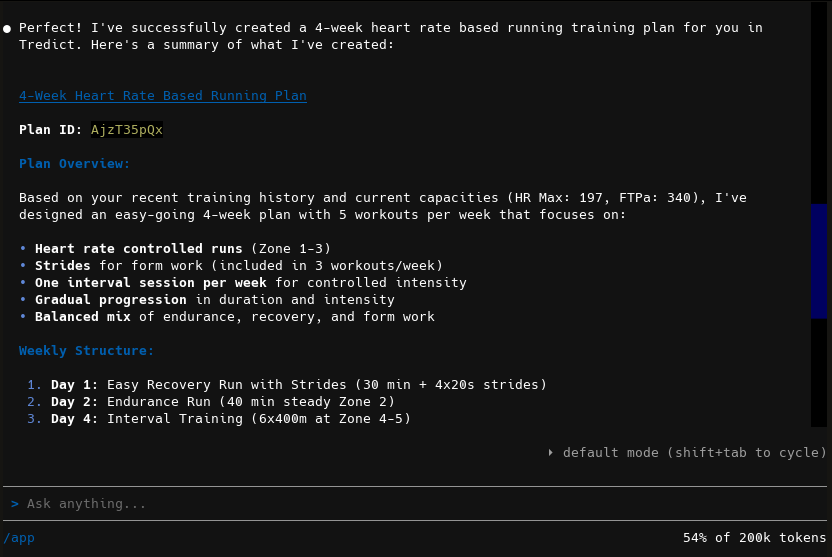
In the Mistral Vibe Terminal, a training plan for running is created by Devstral 2 LLM directly in Tredict.
The resulting training plan, which was created directly in Tredict with the help of Mistral Vibe.
Click on it to view it in detail.
Click on it to view it in detail.
Next question:What is the Model Context Protocol - MCP?
Previous question:Connect Mistral Le Chat with Tredict
Overview:View all questions